AI Search Performance for Brand & PR Teams
Are you a Conductor customer?
Review this article—and the rest of our educational content and activities—in our in-platform Community!
Not a customer? Click here to view this article
Your brand's reputation used to live in news articles, analyst reports, and social feeds. You had tools to monitor all of it. But there's a new channel that most Brand and PR teams haven't fully figured out yet — and it's already shaping how millions of people perceive your brand every single day.
AI search engines like ChatGPT, Gemini, and Perplexity aren't just answering factual questions anymore. They're recommending brands, describing company reputations, summarizing product experiences, and citing sources as authoritative — all without the user ever clicking a link. And your brand is being talked about in those responses right now. Whether that conversation is accurate, positive, and prominent? That part is up to you.
AI Search Performance gives Brand and PR teams the data to understand exactly what AI is saying about their brand, where that narrative is coming from, and how to influence it. This guide shows you how to use it.
🗺️ In this guide:
Why AI Search Is a Brand & PR Problem Now
Your Key Metrics — Translated for Brand Teams
Workflow 1: Monitor Your Brand's Reputation in AI
Workflow 2: Track Which PR Placements Are Actually Influencing AI
Workflow 3: Audit Your Topical Authority
Workflow 4: Watch Your Competitors' Brand Narratives
Workflow 5: Build a Brand Health Dashboard and Automate Your Reporting
Your Brand & PR Starter Checklist

Think about what your team does. You manage how the world perceives your brand. You place stories with journalists to build credibility. You make sure that when a prospective customer, investor, or partner goes looking for information about your company, they find an accurate and favorable story.
Now consider this: a growing share of those searches aren't happening on Google anymore. They're happening in ChatGPT, Perplexity, Google AI Mode, and Gemini. The person researching your brand types a question, and an AI engine synthesizes an answer — drawing on web sources, training data, and cited pages to construct a narrative about who you are, what you stand for, and whether you're worth trusting.
That narrative might be glowing. It might be outdated. It might be built on a critical article from three years ago. And until now, you had no systematic way to know.
The opportunity is significant. Brand and PR teams who understand AI search are better positioned to influence the sources AI draws on, monitor reputation changes in real time, demonstrate the downstream value of PR placements, and make a credible case for why a press placement in Forbes matters differently than one in a niche trade publication.
AI Search Performance ↗️ is your instrument for all of it.

Before diving into workflows, here are the four metrics you'll work with most — and what they actually mean for your team.

Brand Mentions
📈 What it Measures: How often AI engines name your brand in a response
💡 Why Brand & PR Teams Care: Your baseline visibility — are you even in the conversation?
Sentiment Score (1–10)
📈 What it Measures: The overall tone of how AI talks about your brand
💡 Why Brand & PR Teams Care: Your brand health barometer in AI search
Website Citations
📈 What it Measures: How often AI links to your site as an authoritative source
💡 Why Brand & PR Teams Care: Measures your content's credibility with AI engines
Cited Pages
📈 What it Measures: The specific URLs on your site that AI engines reference
💡 Why Brand & PR Teams Care: Tells you exactly which content is doing the reputational heavy lifting
There's also the Top Influential Sources widget — a ranked list of the third-party domains most responsible for shaping AI's sentiment about your brand. For PR teams, this is gold. It tells you which publications are actually influencing AI responses about your brand — not just which ones have the highest readership.
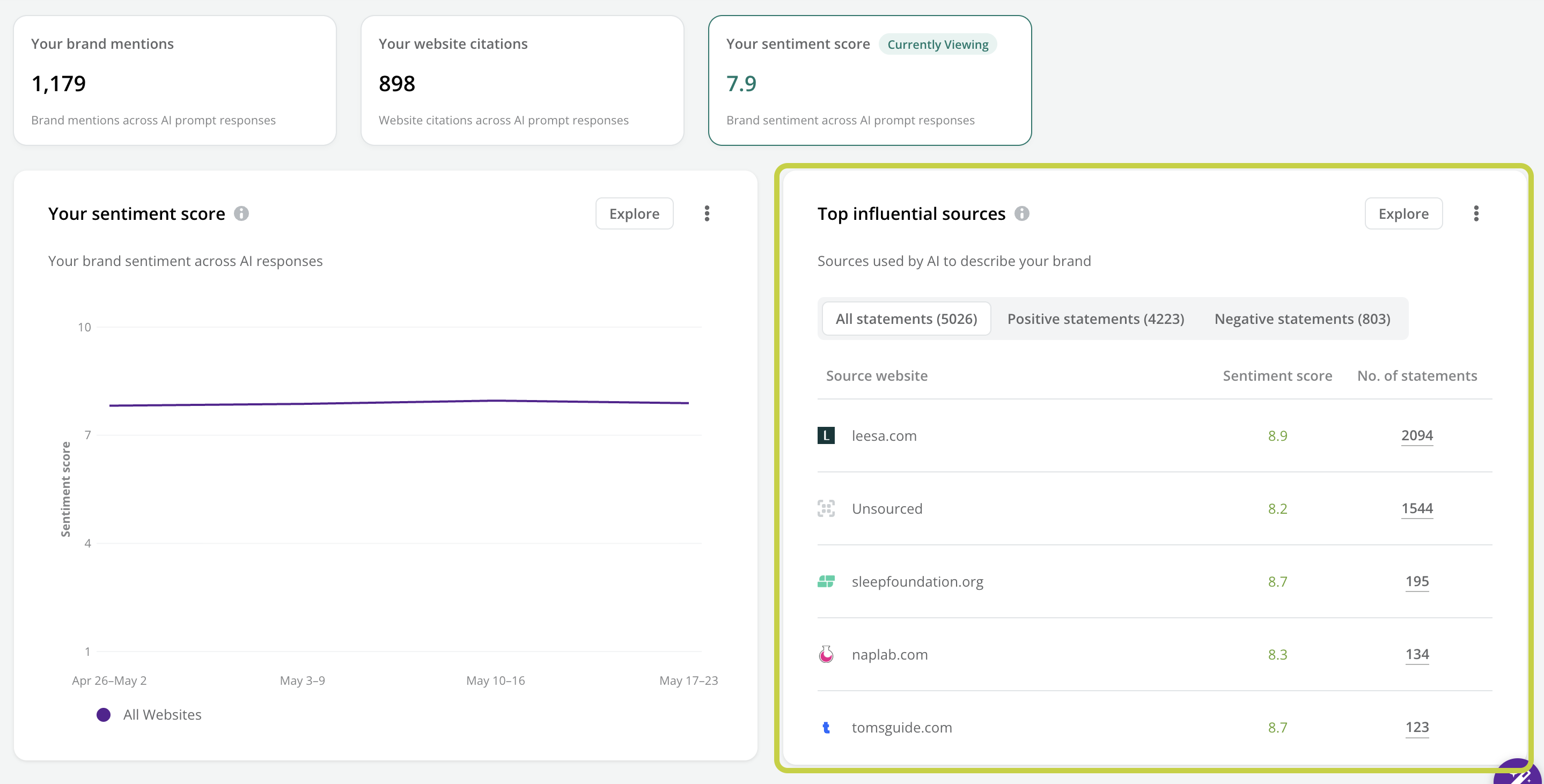
The Takeaway? Brand Mentions tells you if you're visible. Sentiment Score tells you if the narrative is healthy. Citations tell you if your content is trusted. Influential Sources tell you who's shaping the story. Together, they give you a complete picture of your brand's standing in AI search.

The question this answers: What is AI actually saying about us — and is the tone getting better or worse?
This is your ongoing brand health monitoring workflow. Run it regularly (weekly or biweekly) to catch reputation shifts before they compound.
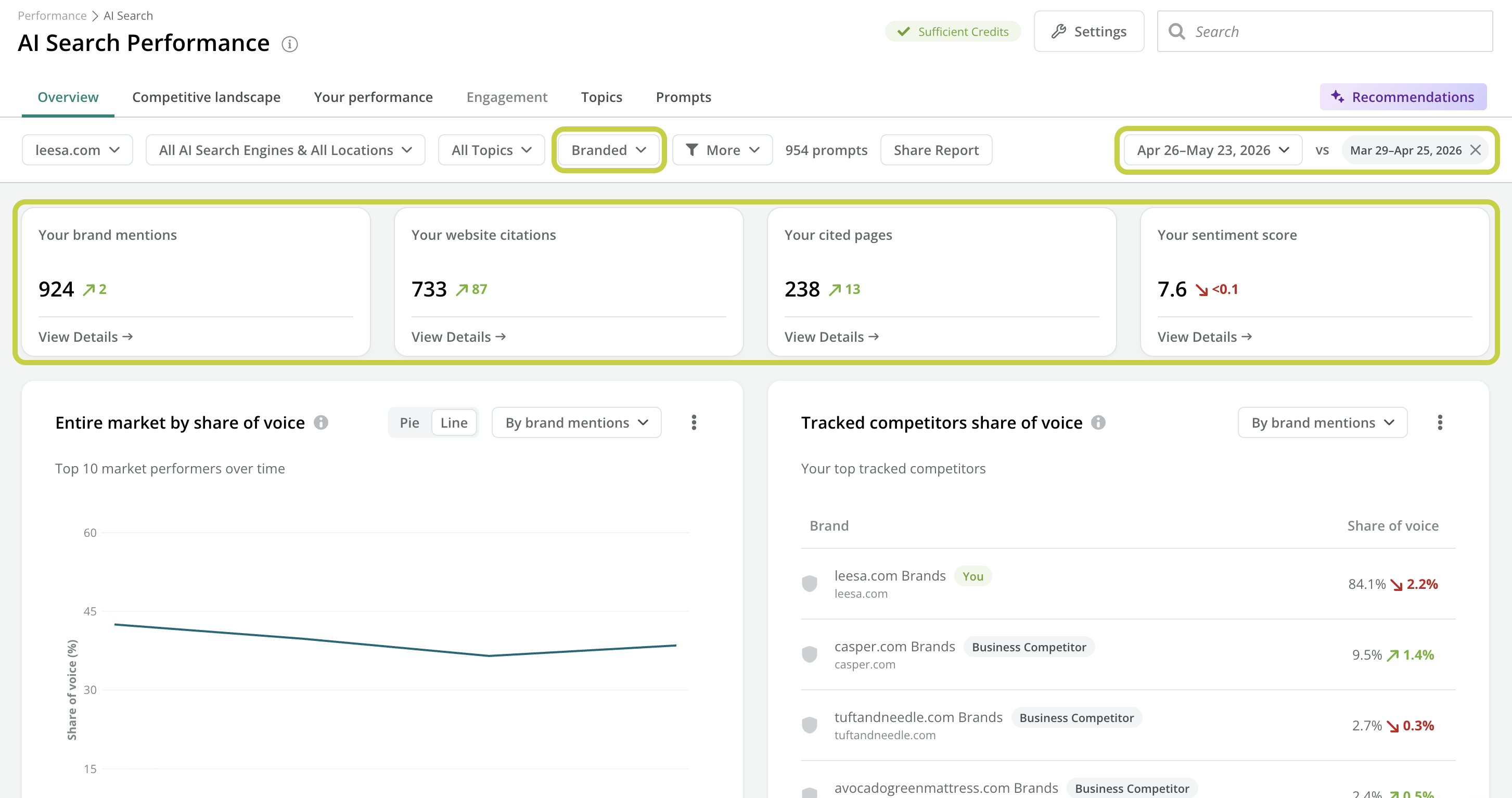
Step 1: Set Your Filters
Go to AI Search Performance (Performance > AI Search). You'll land on the Overview tab.
Set the AI Search Engines filter to include all the platforms that matter most to your audience — ChatGPT, Perplexity, Google AI Mode, Gemini.
Set the Prompt Type filter to Branded. For reputation monitoring, you want to focus on prompts where users are specifically asking about your brand by name — these directly reflect how AI describes you to people who are already interested.
Set your date range and turn on Compare mode so you can track movement over time.
Step 2: Check Your Headline Sentiment
On the Overview tab, review your four Summary Cards. For brand teams, Your Sentiment Score is your starting point — check both the current score and its period-over-period change.
Navigate to Your Performance tab and click the Your Sentiment Score KPI card. This activates the sentiment view and updates all widgets below to show sentiment data.
Review the Your Sentiment Score trend widget to see how your score has moved over time. Then click Explore to open the detailed breakdown — you'll see Positive statements, Negative statements, and your overall score together. This tells you whether a score change is driven by rising negatives, declining positives, or both. That distinction matters for how you respond.

Step 3: Find What's Driving the Narrative
Scroll to the Top Influential Sources widget. This shows the domains most responsible for shaping AI's sentiment about your brand.
-
Use the three tabs to interrogate your story:
All statements — ranked by total statement volume
Positive statements — your brand's biggest allies in AI search
Negative statements — the sources driving unfavorable perceptions
Click Explore on the Top Influential Sources widget for the full source table. Here you can see each domain's statement count, period-over-period change, number of prompts it appears in, and which topics it's associated with.

Pro Tip: Look for the "Unsourced" row in the Influential Sources table. These are statements AI is generating from its own training knowledge — not from any specific web page. A high volume of unsourced statements means part of the narrative you're dealing with isn't directly addressable through publisher outreach. The strategic response there is increasing the volume and quality of your own authoritative content, so AI has better sources to draw from.
Step 4: Check for Audience-Specific Reputation Risks
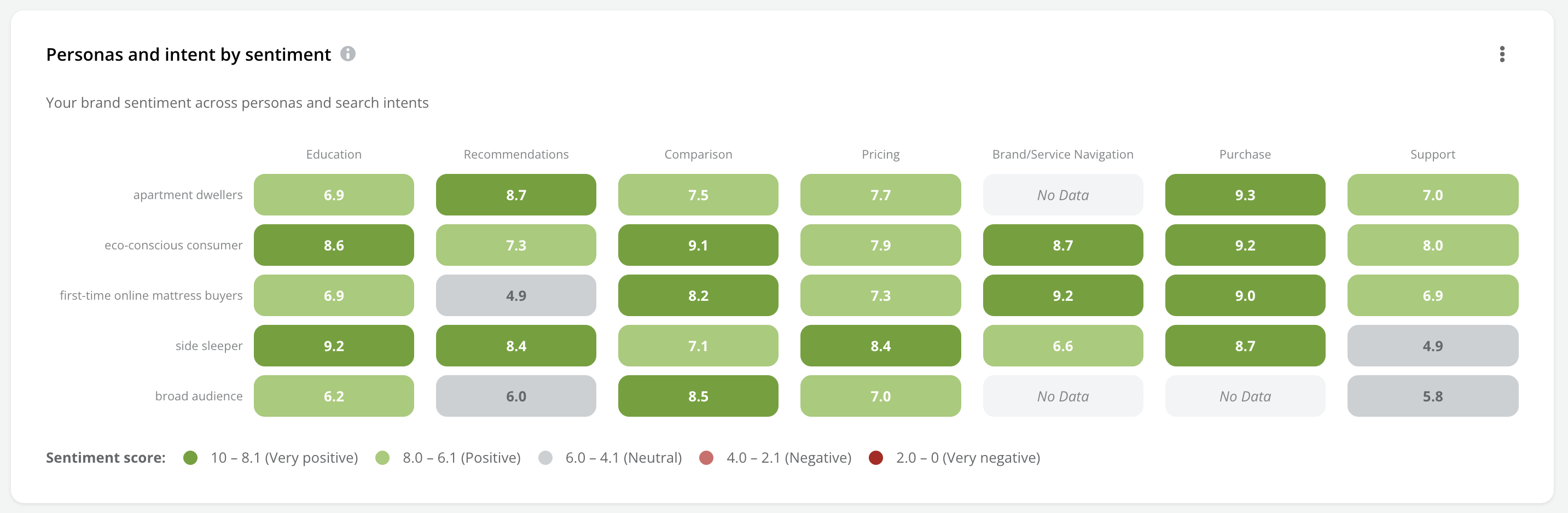
Scroll to the Personas and Intent Heatmap (now in sentiment mode). Your overall Sentiment Score might look healthy — but specific audiences or intent stages could tell a different story. A light or low-scoring cell for a priority persona is an early warning sign worth investigating.
💡 What To Do With What You Find
Negative source identified: Document the specific statements and source URL. If it's a publication you have a relationship with, that's a conversation to have. If the language appears on your own site (a dated product page, an old blog post), it needs updating.
Positive source identified: These sites are your AI credibility allies. They're worth strengthening — through continued outreach, co-marketing, or proactive story pitching.
Audience sentiment gap: Flag the specific persona and intent combination, and brief your content or comms team on the narrative that needs attention.

The question this answers: Which publications are AI engines actually citing — and is our PR strategy creating real AI influence?
One of the hardest problems in PR has always been attribution. You know you placed a story in Fast Company. But did it move the needle? With AI Search Performance, you can now answer a version of that question that was previously unanswerable: is this placement being used by AI as an authoritative source?
Step 1: Review Your Website Citations
Navigate to Your Performance and click the Your Website Citations KPI card. This switches the view to show citation data across your tracked prompts.
Click Explore to see the full breakdown — which specific prompts your site is being cited for, the number of cited pages, and how citation volume is trending.

Step 2: Find Your Most Cited Pages
On the Overview tab, check your Cited Pages KPI card — this tells you how many unique URLs on your site are currently earning citations from AI engines.
Navigate to Your Performance → Your Top Cited Pages → Explore to dig into which specific pages are being cited most. These are the content assets AI considers most authoritative right now.

The Takeaway? Cited pages are the AI equivalent of a high-authority backlink. A page that's frequently cited is a page that AI trusts. Understanding which pages hold this status tells you where your credibility is concentrated — and where it's missing.
Step 3: Cross-Reference With Third-Party Sources
Return to the Top Influential Sources widget in Your Performance > Sentiment Score. Beyond your own site, this shows you which external domains are being cited in AI responses about your brand.
Look for publications where you have existing PR relationships or recent placements. Are they showing up? How many statements are they contributing?
Click Explore to see the full source table with statement counts, topics, and trends. Sort by statement count to identify your most influential external sources.

💡 Practical PR Applications
Measuring placement value: If you placed a story and the publication subsequently appears in your Influential Sources data — and correlates with improved sentiment — that's a concrete, data-backed measure of PR impact.
Prioritizing future outreach: Publications that already have high citation rates with your brand category are higher-value targets than those that don't. Use the Influential Sources data to prioritize your media list.
Briefing journalists: Understanding which topics your brand is most cited for helps you pitch stories that reinforce the narrative you want AI engines to amplify.
Pro Tip: Check the Negative statements tab in the Top Influential Sources widget specifically. If a publication you work with regularly is contributing negative sentiment, that's important to know — and it's a conversation worth having with your PR team or agency before the next placement.

The question this answers: When people ask AI about the topics most important to our brand, are we the one they recommend?
Topical authority is about owning conversations — not just being mentioned. If someone asks ChatGPT "what's the best brand for [your category]?" your goal isn't just to appear in the answer. It's to be the brand the AI recommends confidently and first.
This workflow helps you understand where your brand has that authority, where it's being challenged, and where it doesn't exist yet.
Step 1: Review Your Topic Coverage
Navigate to Your Performance and click the Your Brand Mentions KPI card. Switch to looking at unbranded prompts.
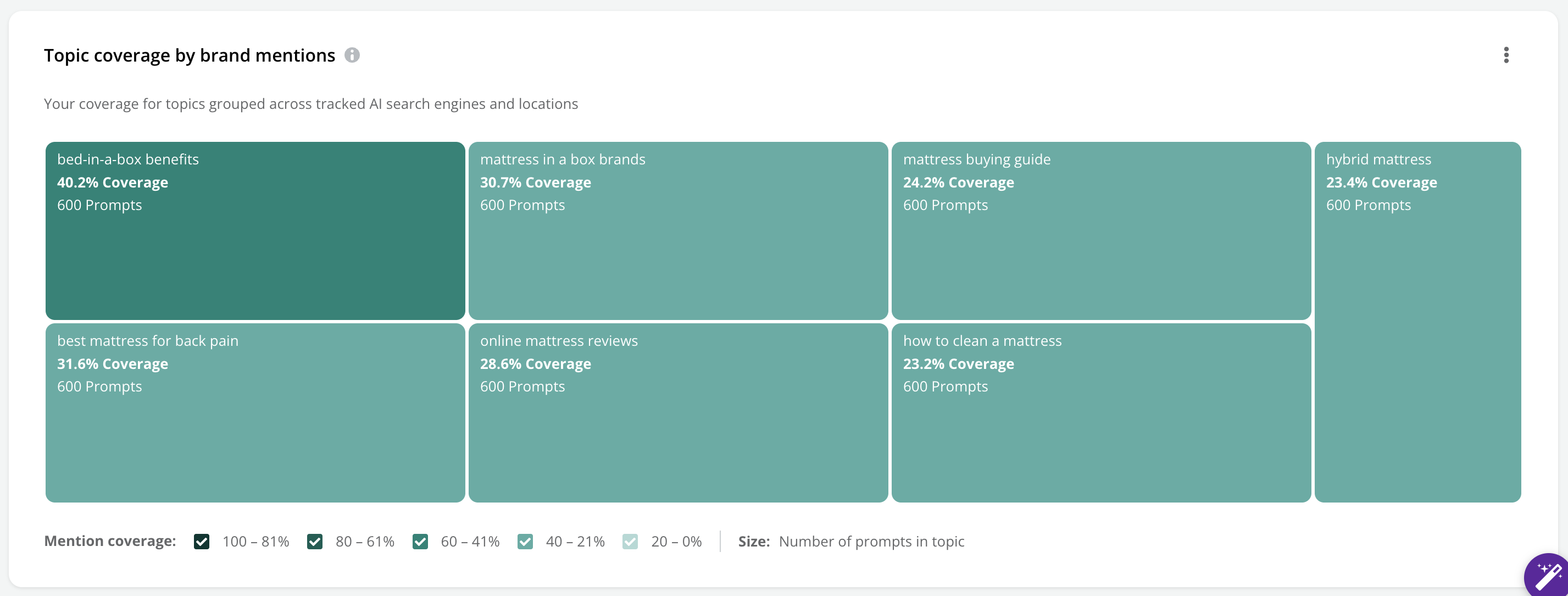
Scroll to the Topic Coverage section. Each tile represents a tracked topic. Darker tiles mean stronger brand mention coverage. Lighter tiles mean you're underrepresented in that conversation.
Pay attention to tile size as well — larger tiles represent topics with more tracked prompts. A large, light tile is your biggest opportunity: a high-traffic conversation where your brand is barely showing up.
Step 2: Map Your Coverage Gaps by Audience
Review the Personas and Intent Heatmap in brand mentions mode. This grid shows your coverage at every intersection of a tracked persona and search intent stage.
Identify which audience + intent combinations have low or zero coverage. From a brand strategy perspective, the most critical gaps are usually in Recommendation intent (when users are asking AI to recommend a brand) and Education intent (when users are researching a category and forming opinions).

The Takeaway? If your brand is invisible in "Recommendation" intent prompts for your target audience, that's not just an SEO problem — it's a brand problem. AI is being asked to recommend brands in your category and you're not in the answer. That's a gap worth addressing with urgency.
Step 3: Identify the Topics Your Competitors Own
Navigate to the Competitive Landscape tab.
Review the Competitive Landscape by Top Topics grid. This shows which brand is "winning" each tracked topic — ranked by how frequently they're mentioned. Scan for topics where a competitor consistently appears first and your brand does not.
Hover over a competitor's entry to see their mention count and trend data. Click their logo to open a filtered view showing every prompt where they're mentioned for that topic — including whether your brand appears in the same prompts.
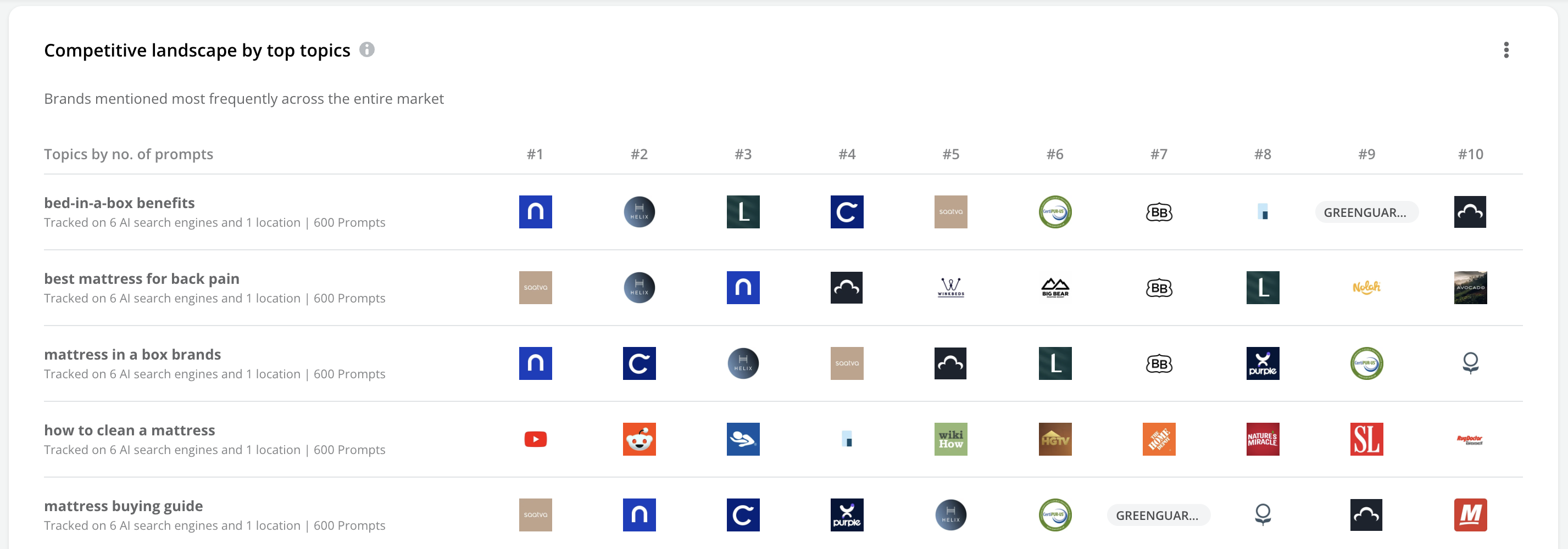
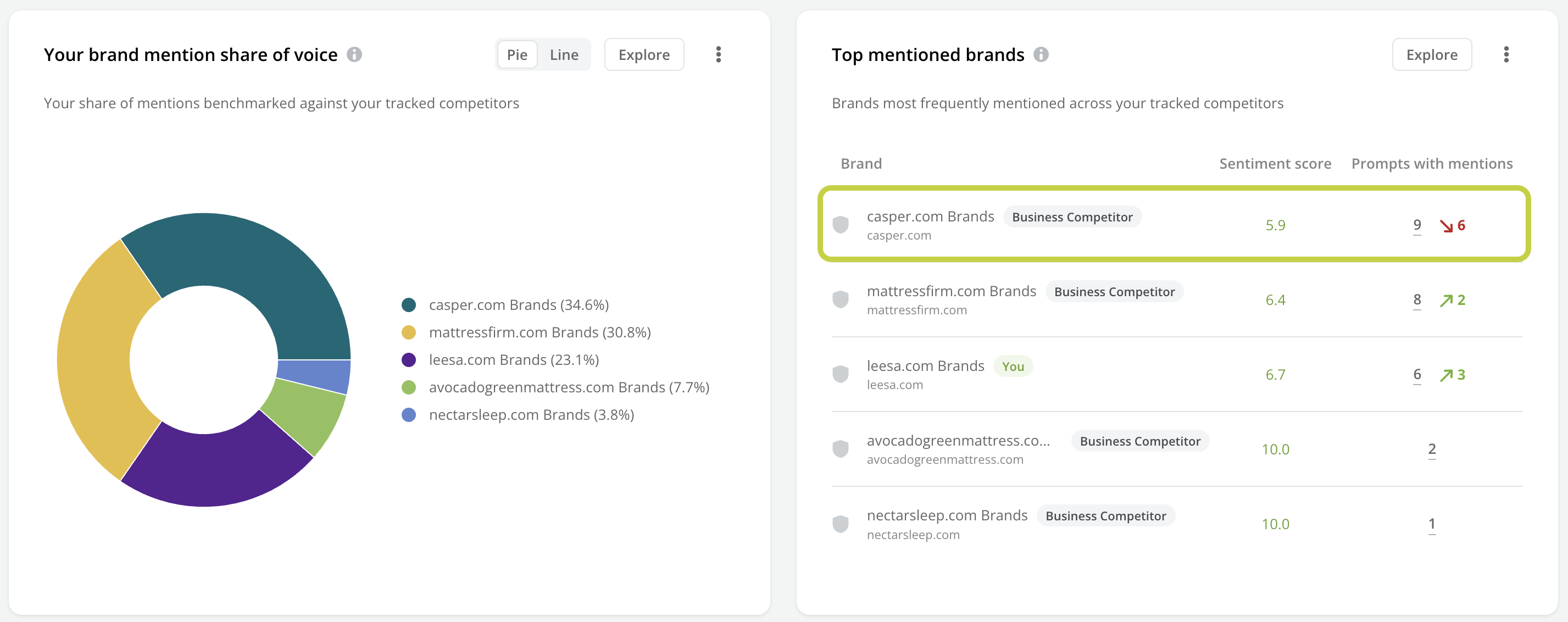
Pro Tip: Look for topics where a competitor has strong mention share but low Sentiment Score — visible in the Top Mentioned Brands table on the Competitive Landscape tab. That's a competitor with a visibility advantage and a perception problem. Publish authoritative, well-sourced content on those topics and you can potentially take share from a brand that's already under reputational pressure in AI.
Step 4: Turn Topic Gaps Into a Content Brief
Navigate to the Prompts tab. Filter by a topic where you have low coverage.
Filter for prompts where your brand is not mentioned. What you see is a list of real questions people are asking AI — questions where your brand isn't part of the answer. Each one is a content brief waiting to happen.
Use the three-dot menu on any prompt to launch Writing Assistant and start building content that earns your brand a place in that conversation.


The question this answers: How is AI portraying our competitors — and are there narrative opportunities we're missing?
Competitive monitoring isn't just about tracking Share of Voice numbers. For brand teams, the more interesting question is often qualitative: what is AI saying about your competitors? Are they being positioned as the premium option? The innovative challenger? And is there a gap in the market narrative that your brand could own?
Step 1: Check Competitive Share of Voice
Navigate to AI Search Performance and set your Prompt Type filter to Unbranded. This is where true competitive dynamics play out — general category questions where AI has to choose which brand to recommend, cite, or describe.
On the Overview, review the Entire Market by Share of Voice widgets (both by mentions and by citations). This gives you the headline competitive picture.
Navigate to the Competitive Landscape tab, switch to "Tracked Competitors" and review the Top Mentioned Brands table. Look at both mention count and Sentiment Score for each competitor. A competitor with high mentions but low sentiment is in a vulnerable position — their visibility is working against them.
Step 2: Identify the Topics Competitors Own
On the Competitive Landscape tab, review the Competitive Landscape by Top Topics grid for both mentions and citations. Build a clear picture of which topics each competitor currently dominates and which ones are genuinely contested.
Click Explore on the Your Brand Mention Share of Voice or Citation Share of Voice widgets to see side-by-side data for your brand versus tracked competitors — including period-over-period change.

Step 3: Monitor Competitor Sentiment Shifts
The Top Mentioned Brands table shows Sentiment Scores alongside mention volume. Track these over time. A competitor's Sentiment Score dipping while their mention volume stays high is an early signal — the narrative around them is souring even as they remain prominent.
Use period-over-period comparison mode to catch these shifts. Changes in competitor sentiment create windows for your brand to step into with better, more credible content.
The Takeaway? Competitive intelligence in AI search isn't just about who's winning — it's about how they're winning and whether that position is stable. A competitor with high visibility and negative sentiment is actually in a precarious spot. That's a strategic opportunity worth tracking closely.

The question this answers: How do I turn these insights into a regular reporting cadence that keeps leadership informed?
Checking the report is one thing. Having a branded, auto-delivered summary that keeps your CMO, CEO, or comms leadership up to date — without you manually pulling data every week — is another. This workflow shows you how to set that up.
Step 1: Set Your Report Filters
-
Navigate to AI Search Performance and set the filters that define your brand monitoring scope:
AI Search Engines: all major platforms your audience uses
Prompt Type: Branded (for reputation monitoring)
Topics: your highest-priority brand narrative topics
Enable Compare mode so every widget shows period-over-period movement
Step 2: Build Your Brand Health Widgets
Add the following widgets to a new Workspace (use the three-dot icon → Add to Workspace on each widget):
Your Sentiment Score trend (from Your Performance) — your brand health headline
Your Website Citations trend (from Your Performance → Explore) — visibility over time
Top Influential Sources — with the Negative statements tab saved, so shifts in negative sourcing are immediately visible
Your Top Cited Pages (from Your Performance) — tracks the footprint of your AI-authoritative content
Performance by AI Search Engine by Sentiment Score (from Overview) — shows whether your reputation varies meaningfully by platform
Competitive Landscape by Top Topics for Citations (from Competitive Landscape) — a weekly check on which other websites are frequently cited for branded prompts

Step 3: Organize and Label the Workspace
-
Navigate to Workspaces and organize your widgets into two sections:
Brand Health — Sentiment Score trend + Website Citations trend + Influential Sources + Cited Pages + Performance by AI Engine
Competitive Watch — Competitive Landscape by Top Topics (citations)

Step 4: Schedule Your Report
Enable the Scheduled E-Mail toggle in your Workspace settings.
Set a weekly delivery cadence — Monday morning works well for teams who review performance at the start of the week.
Add your stakeholders to the recipient list.

Pro Tip: Build two versions of this Workspace — one filtered to Branded prompts (for reputation monitoring) and one filtered to Unbranded prompts (for category and competitive monitoring). They answer different questions and are worth reviewing separately.

New to AI Search Performance? Here are seven things to do in your first session to get your bearings and start building a practice.
✅ 1. Check your Sentiment Score baseline. Go to Your Performance, click Your Sentiment Score, and click Explore. Note your score, the trend direction, and the ratio of positive to negative statements. This is your starting point.
✅ 2. Find out who's shaping your narrative. Review the Top Influential Sources widget. Click through the All statements, Positive statements, and Negative statements tabs. Identify at least one source you need to strengthen and one you need to investigate.
✅ 3. Locate your most AI-cited content. Check the Cited Pages KPI on the Overview. Then go to Your Performance → Your Website Citations → Explore to find which specific pages are earning AI citations. Are they the pages you'd want? Or are there gaps?
✅ 4. Find a topic where a competitor is winning and you're not. Navigate to Competitive Landscape → Competitive Landscape by Top Topics. Identify one topic where a competitor consistently ranks first. That's your first strategic target.
✅ 5. Spot an audience gap in the Heatmap. In Your Performance, look at the Personas and Intent Heatmap (in brand mentions mode). Find a cell with low coverage for a persona and intent combination that matters to your business. That's a content opportunity with a brand strategy rationale.
✅ 6. Filter to Branded + filter to Unbranded — compare what you see. Run the same top-level review twice — once with the Prompt Type filter set to Branded, once set to Unbranded. Notice how your brand's presence changes. The gap between the two is often where the most interesting strategy work lives.
✅ 7. Build your Brand Health Workspace. Set up the dashboard from Workflow 5. Even a basic version — Sentiment Score + Influential Sources + Competitive Landscape by Top Topics — gives you a place to come back to every week and track the story over time.
Done? Explore the full course → Measure and Improve Your AI Search Performance ↗️
Related Resources