Conductor AI: What's New and What's Next
Are you a Conductor customer?
Review this article—and the rest of our educational content and activities—in our in-platform Community!
Not a customer? Click here to view this article
We move fast. This page is your running log of everything that's shipped in Conductor AI — the features, the improvements, and the upgrades that matter to your workflow. Bookmark it, check back weekly, and never wonder 'wait, when did that change?' again.

This week's updates give you more ways to organize and act on your AI visibility data — from custom reporting cohorts and smarter monitoring to keyword intelligence directly in your workflow.
AI SEARCH PERFORMANCE
Prompt Groups (Alpha)
You can now organize prompts into custom cohorts using manual selection or rule-based logic, then use those groups as a filter in your AI Search Performance report. Build views by intent, campaign, persona, or any dimension that matters — and when a prompt belongs to more than one view, it can live in multiple groups at once. Reach out to your account team to inquire about alpha access.

Read more about Prompt Groups: Stay Organized at Scale: Introducing Prompt Groups
Inactive Topics Notification
No more guessing why your metrics shifted. When inactive topics and prompts are included in your report via Settings → Data Display, a notification now appears at the top of the AI Search Performance page to let you know. You get the right context to interpret any changes in charts, share of voice, or citation data — without extra noise when the setting is off.

Data Collection in Progress State
Know exactly where you stand during setup. If you open AI Search Performance after starting your topics but before data is ready, you'll now see a clear "Data collection in progress" message explaining what's happening and when to expect results. A View Topics shortcut is right there so you can review your topic configuration while you wait.

AI Search Response API Endpoint
Bring AI search response data directly into your own workflows. The new ai_search_response endpoint gives you programmatic access to AI-generated results from ChatGPT, Gemini, Perplexity, and other engines — so your team can analyze and act on AI visibility data at scale without manual lookups. Read more about Conductor API: AI Search - Response
CONDUCTOR MONITORING
Technical AEO (Beta)
AI engines are less forgiving than traditional search — a page that ranks well in Google can still struggle to be cited by AI systems. Technical AEO adds 20 new issue detections and a new Issue Type filter to Conductor Monitoring, so you can view SEO issues, AEO issues, or both in a single workflow. Catch and fix the technical gaps affecting your AI visibility before they impact performance, all within the monitoring workflow you already use for SEO.
📺 Watch: Technical AEO — How to Optimize Your Website for AI Answer Engines
Read more about Technical AEO: Technical AEO: How to Optimize a Website for AI Answer Engines
CONDUCTOR MCP
Keyword Insights in Conductor MCP (Alpha)
Get rank trends, SERP feature breakdowns, competitive comparisons, and single-keyword deep dives — all in one tool call inside Claude, without ever leaving your workflow. Eleven analysis modes are available so you can pull exactly the view you need, fast. Reach out to inquire about alpha access.

This week's updates give you sharper control over how you analyze topic performance and filter your AI Search Performance reporting by brand.
AI SEARCH PERFORMANCE
Topics Grid Enhancements
Three new additions to the Topics grid make it easier to understand and manage your tracked topics at a glance. Tracking Status is now visible under Topic Details so you can quickly confirm whether a topic is active. No. of Prompts shows how many prompts are tied to each topic, so you can spot coverage gaps before they affect your data. And the Top Mentioned Brands column now includes a multi-select Brand filter — search, select multiple brands, and narrow the grid down to exactly what's relevant.
Brand Filter Now Available as a Global Filter
You can now filter all of AI Search Performance by a specific brand configured for your website. Select a brand and the report updates to show only that brand's performance — no noise from the others. When combined with a Page Group filter, it's the fastest way to pull reporting that reflects exactly what your team owns and shares results stakeholders actually care about.


This week's updates give you more control over how prompts are generated, how often topics are tracked, and what slice of your site you're actually reporting on.
AI SEARCH PERFORMANCE
Custom Instructions for Topic & Prompt Generation
You can now guide how Conductor generates topics and prompts — add required terms, persona weighting, tone preferences, seasonal context, and more. Instead of editing generic AI output, you get prompts that reflect your strategy from the start.
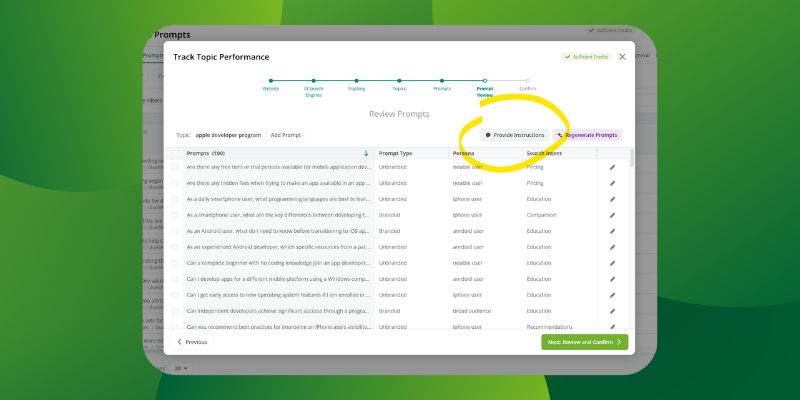
Relevant Guides for Custom Instructions for Topic & Prompt Generation: AI Search Performance Tracking Best Practices AI Search: Refine Your Prompt Tracking Strategy for Maximum ROI
Monthly Tracking
Monthly is now a tracking cadence option alongside daily and weekly. Use it for broader strategic topics that need consistent coverage but don't need to be on your radar every week. First collection runs within a day of setup; after that, it's the beginning of each month.
Page Groups Filter
Filter AI Search Performance by specific page groups instead of your whole site. Ideal for teams that own a section of the website and want reporting that reflects their actual scope — not everything else.


This week’s updates are focused on two things: more flexibility in how you analyze your market, and making it easier to build agentic workflows on top of Conductor data.
AI SEARCH PERFORMANCE
Choose What to Display: Chart, Data Grid, or Both
When adding an AI Search Performance report to a workspace from an Explore modal, you can now choose to include a chart, a data grid, or both. Show exactly what you need — nothing more, nothing less.

Build Your Own Market View
You can now define your own market by selecting the specific competitors that matter to you. The market share calculation updates automatically based on your selection, and a dynamic pie chart makes it easy to visualize your positioning and share with stakeholders.

Top 10 Competitors in the Overview
Your top 10 competitors and their performance trends are now visible in a single view. No more toggling between reports to get the competitive picture.

DEVELOPER EXPERIENCE
Everything You Need to Build Agentic AEO Workflows
conductor.com/docs is now your one-stop shop for building on top of Conductor data — MCP Server, Data API, and a Template Gallery with ready-to-use LLM skill templates. If you're building agentic workflows or integrating Conductor into your own tools, this is where to start.


A big one this week — AI Search Performance 2.0 is now live for everyone, plus a handful of updates that make day-to-day management faster.
AI SEARCH PERFORMANCE
AI Search Performance 2.0 Is Live for Everyone
As of April 13, AISP 2.0 is available across all accounts. Expect faster performance, improved usability, and more actionable insights — with your full historical data carried over automatically. No action needed on your end.
Get up to speed:
Read the Re-Orientation Guide in our Learning Library for a full walkthrough of what's changed.
Explore our refreshed AI Search Performance tutorials, including two new reporting workflows.
Admin Email Notifications for Pending Approvals
Admins now get an email when prompts or topics are waiting for approval. Conductor checks multiple times a day and only sends a notification when there's actually something to review — no noise, just the signal you need to keep things moving.

New AI Search Engine: Grok (Auto)
Grok joins the lineup of AI search engines you can track in Conductor. It automatically switches between live search and static knowledge depending on the query. Supports country and city/state-level tracking. Cost: 1 credit per AI response.

Personas & Intents Charts — Updated
Both trend charts now highlight your top 5 performers by default. Less noise, faster insight — and you can still explore beyond the top results when you need to.

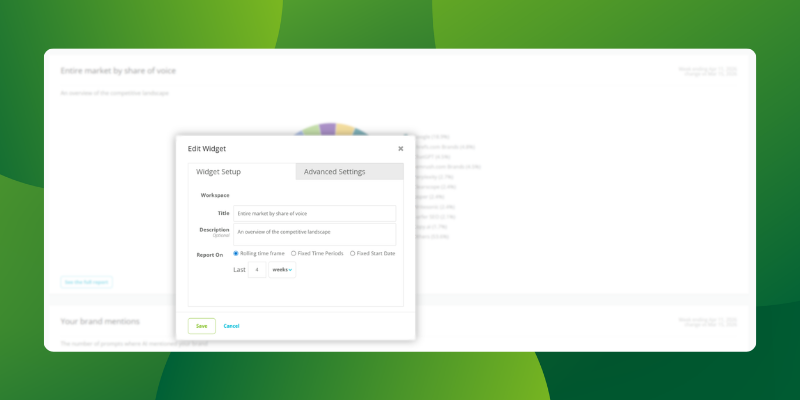
Workspace Widgets Are Now Editable
Edit widget titles, descriptions, and time periods directly from your workspace. Especially useful when sharing dashboards with stakeholders who need reports framed in their own language.
Bulk Upload Shortcut
Skip the full setup wizard and go straight to uploading your topics and prompts XLSX. Just enter your website, search engines, and location — done.
